
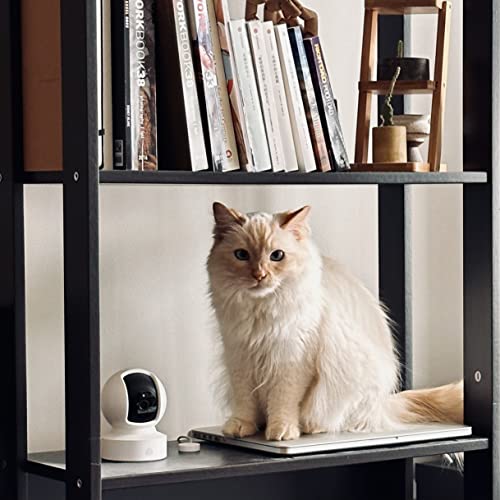
The Kasa Pet Camera range offers clear indoor monitoring, useful motion alerts, and strong value for everyday pet care.
Your dog may bark when you leave, or your cat may knock things over while you are away. A pet camera helps you check in without guessing. Kasa offers several indoor cameras with live video, night vision, motion alerts, and two-way audio. Some models pan and tilt, while others provide a fixed view. In this Kasa Pet Camera Review, I compare five popular Kasa models. I focus on image quality, viewing range, app features, setup, pet use, and overall value.
See the differences between my top picks at a glance.
Kasa EC70 1080p Pan/Tilt Camera

The Kasa EC70 is a practical choice for pet owners who need a wider view of an indoor room. It records in 1080p and uses a pan-and-tilt design. That design lets you adjust the camera view from the Kasa app. I find this useful when a dog moves from a bed to a play area or when a cat climbs onto a shelf.
The camera also supports night viewing and two-way audio. You can watch your pet in low light and speak through the camera when needed. The wired design means you need a nearby outlet, so placement takes a little planning. For basic home use, the EC70 offers a strong mix of useful features and a simple price.
Pros:
- 1080p video gives a clear view for routine pet checks
- Pan-and-tilt control helps cover more of a room
- Two-way audio supports voice contact from a phone
- Night vision helps with evening and low-light viewing
- Useful for pets, children, and general indoor monitoring
- Compact design fits well on a shelf or table
Cons:
- It needs a power outlet and does not work as a cordless camera
- 1080p video shows less detail than Kasa 2K+ models
- Pan and tilt cannot replace a camera placed at every angle
What Amazon Buyers Are Saying
Amazon buyer feedback commonly focuses on the EC70’s simple setup, remote viewing, and useful pan-and-tilt control. Buyers who want a low-cost indoor camera often like the ability to check pets from a phone. Two-way talk and night viewing also appear to be important reasons for choosing this model.
As with many Wi-Fi cameras, some buyers report that network strength and app setup affect the experience. A few users may also prefer local storage or more advanced pet alerts. Read the current listing and recent reviews before purchase, since app features, subscription terms, and customer experiences can change.
My Recommendation
I recommend the EC70 for buyers who want a dependable 1080p pet camera with remote pan and tilt. It is especially suitable for a small or medium room. It is worth buying when basic coverage matters more than the sharpest image.
Kasa EC71 1080p Pan/Tilt Camera

The Kasa EC71 is another 1080p indoor pan-and-tilt camera built for simple monitoring. Its main strength is the ability to move the view through the app instead of relying on one fixed angle. This can help when your pet uses more than one part of a room. It also works well as a basic baby monitor or indoor security camera.
The EC71 includes features that matter during daily pet care, such as night viewing and two-way audio. The camera connects through Wi-Fi and uses a wired power connection. I would place it where the lens has a clear view and the cable stays away from chewing pets. It is a sensible option for buyers who want flexible viewing without moving to a higher-resolution model.
Pros:
- Pan-and-tilt control gives more flexible room coverage
- 1080p resolution suits everyday pet monitoring
- Night vision supports checks after dark
- Two-way audio lets you speak to people or pets
- Can serve as a pet, baby, or indoor security monitor
- Small footprint makes shelf placement easy
Cons:
- It requires continuous power from an indoor outlet
- It does not offer the added detail of a 2K+ camera
- Wi-Fi performance depends on the strength of your home network
What Amazon Buyers Are Saying
Amazon buyers often praise the EC71 for its remote viewing and moving lens. These features help users check a wider section of a room than a fixed camera can show. Buyers also tend to value the phone alerts, night view, and talk function for quick checks during the day.
The most common concerns with this type of camera relate to connection quality, setup, and the limits of a wired indoor design. Some users may want more storage choices or smarter pet detection. Check the current Amazon page for the latest buyer comments and the exact software features offered at the time of purchase.
My Recommendation
The EC71 is a good fit for a buyer who wants flexible 1080p monitoring at a reasonable cost. I would choose it for a room where a pet moves around often. It offers good value, but the 2K+ models make more sense when fine image detail is a top concern.
Kasa KC410S 2K+ Pan/Tilt Camera

The Kasa KC410S is the strongest all-around option in this comparison for buyers who want sharper video and flexible coverage. It uses 2K+ video and a pan-and-tilt lens. The higher resolution can make small details easier to see, such as a pet’s position, a collar, or activity near the edge of the room. This benefit matters most when the camera sits far from the pet’s main area.
The KC410S also includes core pet-monitoring tools such as night vision and two-way audio. Its moving view helps reduce blind spots in a single room. A wired connection keeps the camera ready for use, but it limits placement to areas near an outlet. I see this model as a strong upgrade for owners who find 1080p video too soft or who want more detail during live viewing.
Pros:
- 2K+ video offers more detail than standard 1080p models
- Pan and tilt help follow pets across a room
- Useful for larger indoor spaces than a fixed camera
- Night vision supports low-light pet checks
- Two-way audio allows remote voice contact
- Good choice for users who want a feature-rich Kasa camera
Cons:
- Higher resolution may use more network bandwidth
- It still needs a nearby power outlet
- Extra image detail may not matter in a very small room
What Amazon Buyers Are Saying
Amazon buyers commonly point to the KC410S image quality and pan-and-tilt movement as its main benefits. Users who monitor active pets often appreciate the wider control of the lens. Buyers also value the ability to view a room remotely and use two-way sound for quick interaction.
Some buyers may mention Wi-Fi setup, app behavior, or the need to place the camera close to a suitable outlet. These points are common considerations for connected indoor cameras. I suggest reviewing recent feedback about the current app and checking whether the camera’s storage and alert features meet your needs.
My Recommendation
I recommend the KC410S when image detail and room coverage matter most. It is the best pan-and-tilt choice in this Kasa Pet Camera Review. It costs more than basic 1080p options, but the upgrade is easier to justify in a larger room or for active pets.
Kasa KC400 2K+ Indoor Camera

The Kasa KC400 is designed for buyers who want 2K+ image quality without a moving pan-and-tilt lens. Its fixed view keeps the camera pointed at one chosen area. This simple design works well when your pet spends most of the time in one room or near one bed, crate, food area, or play space.
A fixed camera also has a practical advantage: you do not need to adjust the lens to follow a moving pet. You can aim it at the most important part of the room and leave it there. The KC400 also supports night viewing and two-way audio for daily use. It is a strong choice when clear video matters more than remote lens movement.
Pros:
- 2K+ resolution provides a sharp view of an indoor area
- Fixed design is simple to aim and use
- Good fit for a pet bed, crate, or regular activity zone
- Night vision supports monitoring after dark
- Two-way audio allows short voice communication
- Useful as a general indoor camera as well as a pet monitor
Cons:
- Fixed viewing cannot follow a pet across the room
- It needs a power outlet for continuous use
- One camera may leave blind spots in a large room
What Amazon Buyers Are Saying
Amazon buyers often like the KC400 for its clear image and straightforward fixed view. It appeals to people who want to watch one room without paying for pan-and-tilt movement. Night viewing and two-way audio also add value for owners who check pets in the evening or speak to them while away.
The fixed lens is the main point that buyers should consider before ordering. Some users may expect a camera that follows a pet, while this model works best when aimed at a set location. Customer feedback can also differ based on home Wi-Fi, phone settings, and the camera’s placement.
My Recommendation
The KC400 is worth buying for a clear, steady view of one important area. I prefer it over a 1080p fixed camera when image detail matters. Choose the KC410S instead if your pet moves often and you need remote pan-and-tilt control.
Kasa EC60 1080p Indoor Camera
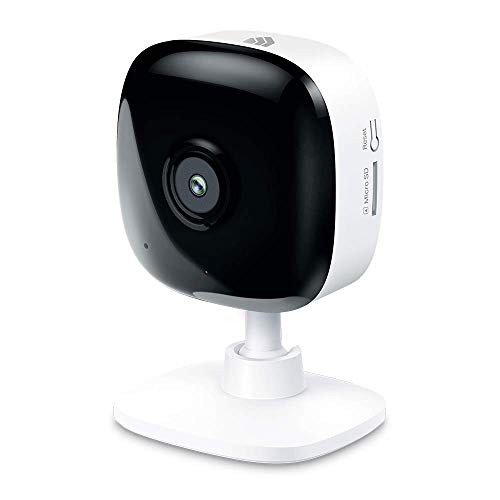
The Kasa EC60 is the simplest model in this group. It records in 1080p and uses a fixed indoor view. This makes it useful for buyers who want basic pet monitoring without pan-and-tilt control. You can aim it at a pet bed, crate, or room entrance and check that area from your phone.
The EC60 also provides key features for daily use, including night vision and two-way audio. Its small size makes it easy to place on a shelf or table. Since the camera uses a wired power connection, it suits a set location rather than frequent moves. I would consider it when price and basic function matter more than higher resolution or a wider moving view.
Pros:
- 1080p video handles basic indoor pet checks
- Fixed design keeps setup simple
- Night vision helps you view a dark room
- Two-way audio supports remote voice contact
- Compact size suits shelves and small spaces
- Good entry point for first-time pet camera buyers
Cons:
- It cannot pan or tilt to follow a moving pet
- 1080p offers less detail than Kasa 2K+ models
- A wired design limits placement near an outlet
What Amazon Buyers Are Saying
Amazon buyers often choose the EC60 for its basic function and low-cost approach. Users who need a camera for one small area tend to value the fixed view, phone access, and simple monitoring tools. Night vision and two-way sound add useful features without requiring a more advanced camera.
The main limits are clear from the design. Buyers who want a moving lens or very sharp video may find the EC60 too basic. As with the other models, the quality of the home Wi-Fi connection can affect live viewing and alerts. Check current buyer reviews for details about setup and app performance.
My Recommendation
I recommend the EC60 for a small room, a fixed pet bed, or a first indoor camera. It is not the best choice for tracking an active pet. Still, it offers good basic value when you want a simple 1080p monitor and do not need advanced coverage.
How to Choose a Kasa Pet Camera
Choosing the right Kasa Pet Camera Review pick depends on your room, pet, and viewing habits. A camera that works well for a cat bed may not suit a dog that runs through the whole room. Start with the features that affect daily use. Then compare image quality, lens movement, placement, and total cost.
1. Match the Resolution to the Room
Resolution affects how much detail you see in live video. Kasa 1080p cameras can work well for a small room and normal pet checks. They show your pet clearly when the camera sits close to the main activity area.
A 2K+ model can show more detail. This helps when the camera sits farther away or when you want to see small actions. For example, a higher-resolution view may help you check whether a pet is resting, chewing an item, or standing near a door. Keep in mind that sharper video may place more demand on your Wi-Fi network.
Do not pay for extra resolution if your room is small and your needs are simple. If you want the clearest image from one camera, the KC410S and KC400 deserve closer attention.
2. Choose Pan-and-Tilt or Fixed View
Pan-and-tilt cameras give you remote control over the viewing direction. The EC70, EC71, and KC410S can suit pets that move around a room. You can adjust the lens from the app instead of walking over to the camera.
A fixed camera has a smaller viewing range, but it can work very well in the right place. The KC400 and EC60 suit a pet bed, crate, feeding space, or other set area. A fixed model also reduces the number of settings you need to manage.
Think about your pet’s routine. Choose pan and tilt for active movement. Choose a fixed view for one important area. If your pet uses a full floor or several levels, one camera may not cover every spot.
3. Review Placement, Wi-Fi, and Long-Term Value
Every model in this comparison uses a wired indoor power connection. Before buying, check that an outlet sits near the planned location. Keep the cord away from pets that chew. A high shelf may improve the view, but it must remain stable and safe.
Your Wi-Fi network also matters. Place the camera where it can receive a steady signal. A weak connection may cause delays, lost video, or missed alerts. Test the camera soon after setup so you can move it if needed.
Finally, review storage and app terms before you buy. Features can vary by model, software version, and plan. Check the current Amazon listing and manufacturer details for the latest information. The best value comes from a camera whose features you will use often, not simply the model with the longest feature list.
Final Verdict: Which Should You Buy?
For most buyers, I recommend the Kasa KC410S. Its 2K+ video and pan-and-tilt control offer the best balance of detail and coverage. Choose the KC400 for a fixed view, or the EC60 for a lower-cost setup.
This Kasa Pet Camera Review shows that each model fits a different room and budget. Check the current price, app terms, and buyer feedback before ordering.
FAQs Of Kasa Pet Camera Review
Is a Kasa pet camera good for monitoring dogs and cats?
Yes. Kasa indoor cameras can help you check dogs and cats through live video, night viewing, motion alerts, and two-way audio. Choose pan and tilt if your pet moves around the room.
Which Kasa pet camera has the best picture quality?
The KC410S and KC400 use 2K+ video and offer more detail than the 1080p EC70, EC71, and EC60. The KC410S adds pan-and-tilt control.
Should I choose a pan-and-tilt or fixed Kasa camera?
Choose pan and tilt for pets that move across a room. Choose a fixed camera when you mainly watch one bed, crate, feeding area, or small space.
Do Kasa pet cameras need to stay plugged in?
Yes. The models reviewed here use wired indoor power. Plan the camera location near a suitable outlet and keep the cable away from pets.
Can I talk to my pet through a Kasa camera?
These models include two-way audio, which lets you speak through the camera from a compatible phone app. Performance depends on the camera, app, and network connection.
