
The best wireless pet camera with speaker and screen is Kasa EC70 for clear video, smooth control, and easy two-way talk.
You leave for work, then wonder if your dog is calm or your cat has knocked over the water bowl. A pet camera lets you check in from your phone and speak through the built-in speaker. These cameras also help you watch meals, naps, play, and odd behavior while you are away. In this guide, I compare four popular indoor cameras with Wi-Fi video, phone viewing, two-way audio, night vision, and pan-and-tilt control. None of these models has a built-in viewing screen. Instead, each uses your phone or tablet as the screen, which gives you a larger and more useful view.
See the differences between my top picks at a glance.
Kasa EC70 1080p Pan-Tilt Pet Camera

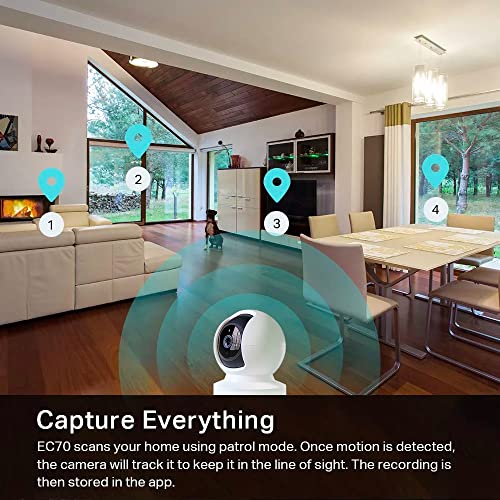
The Kasa EC70 is a strong choice for pet owners who want a simple indoor camera with a broad view. It records in 1080p resolution, so your phone screen can show useful detail across a normal room. Its pan-and-tilt design helps you look around instead of watching one narrow spot. That matters when a dog moves from a bed to a food bowl or a cat jumps onto a sofa.
The camera also includes two-way audio and night vision. I like this mix because it covers the main tasks of a daily pet monitor without adding needless complexity. You can check your pet from the Kasa app, listen for sound, and speak through the camera speaker. It needs a nearby power outlet, so it is wireless for network viewing but not battery powered.
Pros:
- Clear 1080p video for everyday indoor viewing
- Pan-and-tilt movement covers more of a room
- Two-way audio lets you speak and listen
- Night vision supports low-light checks
- Compact design fits shelves, desks, and pet areas
- Useful motion alerts help you notice activity
Cons:
- It needs a power cable and is not fully wire-free
- It is designed for indoor use
- Cloud and storage features may depend on the current plan or setup
What Amazon Buyers Are Saying
Common buyer feedback points to easy setup, useful app viewing, and good value for basic home monitoring. Many owners like the ability to turn the view and check a pet from another room. Two-way talk also gets attention because it can help calm a dog or interrupt unwanted behavior.
As with most connected cameras, some buyers report mixed experiences with Wi-Fi setup, app behavior, or notification timing. The camera works best when placed near a stable router signal. Before buying, I suggest checking the current Amazon listing for supported Wi-Fi bands, storage terms, and app requirements.
My Recommendation
I recommend the Kasa EC70 to most pet owners who want a dependable first camera at a sensible price. It offers the core features that matter most: a movable view, clear video, night vision, and two-way sound. It does not include a dedicated screen, but your phone serves as a better viewing device for many users. I rate it 4.5 out of 5.
Tapo C100 1080p Indoor Pet Camera

The Tapo C100 focuses on simple indoor monitoring. It gives you 1080p video, night vision, motion detection, and two-way audio through a phone app. Its fixed indoor design suits a pet bed, crate area, hallway, or room corner. If your pet usually stays in one place, you may not need motorized movement.
This camera works well for owners who want a low-cost way to check in during the day. The speaker can help you talk to your pet, while the microphone lets you hear what is happening near the camera. Like the other models in this guide, it needs wired power even though the video connects through Wi-Fi. That detail is important when planning placement.
Pros:
- 1080p video gives a clear view of a small indoor area
- Two-way audio supports quick voice check-ins
- Night vision helps in dark rooms
- Motion alerts can notify you when activity starts
- Small size makes it easy to place near a pet bed
- Simple feature set suits first-time camera buyers
Cons:
- It does not pan or tilt to follow a moving pet
- It requires a power cable
- One camera may not cover a large or open floor plan
What Amazon Buyers Are Saying
Buyer comments often praise the C100 for its price, compact size, and basic monitoring tools. Owners commonly use it for dogs, cats, puppies, and other indoor checks. The phone alerts and two-way talk are useful for quick updates when an owner cannot be home.
Some buyers mention that setup depends on a strong wireless connection and that a fixed lens limits coverage. A few also note that app or storage features can change with software updates and account settings. I would place this camera where your pet spends most of the day, rather than expecting it to cover every part of a large room.
My Recommendation
The Tapo C100 is worth buying if you want an affordable, fixed-view camera for one pet zone. It is not the best choice for a pet that moves throughout the house. Still, its video, night vision, and two-way sound cover the basics well. I rate it 4.2 out of 5 for value and 4 out of 5 overall.
blurams 360° PTZ Pet Camera 2-Pack

The blurams two-pack is made for owners who need more than one viewing point. You can place one camera in the main living area and another near a pet room, entry, or feeding space. Each unit uses a 360-degree pan-and-tilt style view, which can reduce blind spots compared with a fixed camera. This setup is useful in homes with more than one active pet area.
The cameras support phone viewing, two-way audio, and night vision. The 2-pack also adds practical value when you want coverage in separate rooms. I would still test each location before final mounting, since walls and distance can affect Wi-Fi performance. Be sure to review the current listing for exact app, storage, and network requirements before checkout.
Pros:
- Two cameras cover separate rooms or pet zones
- 360-degree PTZ viewing helps reduce blind spots
- Two-way audio supports voice contact from your phone
- Night vision helps with evening and overnight checks
- Useful choice for multi-pet homes
- One purchase can cover more space than a single camera
Cons:
- Two units mean two setup points and two power cables
- More cameras can make app management less simple
- Storage and advanced functions may depend on current service terms
What Amazon Buyers Are Saying
Common buyer themes center on the convenience of two cameras and the wide viewing range. Owners often like using one unit in a living room and the other in a different area. The ability to turn the view from a phone can help when a pet leaves the center of the frame.
Some customer experiences point to the need for careful placement and a stable network. Buyers may also have different views about notification speed, audio quality, and app setup. Those results can vary by home layout, router, phone, and software version, so I would treat the two-pack as a flexible monitoring system rather than a guaranteed security solution.
My Recommendation
I recommend the blurams 2-pack for homes with two pet areas or more than one floor-level view to monitor. It offers better coverage than a single fixed camera and can save money compared with buying two separate units. Choose it only if you are comfortable managing two connected devices. I rate it 4.3 out of 5.
DYPCO 360° PTZ Pet Camera 2-Pack

The DYPCO two-pack targets buyers who want broad indoor coverage at a budget-minded price. Each camera uses a 360-degree PTZ design, so you can view more of a room from the companion phone app. It includes motion detection, two-way audio, and night vision for common pet-monitoring tasks. The two units can help you watch separate rooms without moving one camera each day.
This model also lists cloud and SD card storage options, but storage terms can vary by package, app, and region. I would confirm the current details before buying a memory card or subscribing to a plan. The cameras need power, and the word “wireless” refers to the Wi-Fi connection rather than a cordless battery design. That is typical for this category and worth planning for.
Pros:
- Two cameras give useful multi-room coverage
- 360-degree PTZ movement supports a broad view
- Motion detection can help flag pet activity
- Two-way audio lets you speak through each camera
- Night vision supports checks in dim rooms
- Cloud and SD card options offer storage flexibility
Cons:
- It is not a battery-powered camera
- Storage features may require extra setup or fees
- Two app-connected units may take longer to configure
What Amazon Buyers Are Saying
Buyer feedback commonly highlights the two-camera value and the convenience of viewing more than one room. Owners often look for the PTZ movement, motion alerts, and two-way talk when comparing this type of camera. These tools can make it easier to check a pet without walking through the house.
Some buyers may report differences in setup ease, alert behavior, or connection quality. Such issues often depend on router range, phone settings, and the location of each camera. I recommend testing live video and audio before leaving your pet alone for a long period. Also, check the current product page for the latest storage and compatibility details.
My Recommendation
The DYPCO 2-pack is a practical pick for shoppers who want two PTZ cameras and flexible storage choices without a premium setup. It offers a lot of useful pet features, but buyers should be ready to spend time on app setup. I would choose it for multi-room coverage, not for a simple one-camera installation. I rate it 4.1 out of 5.
How to Choose Best Wireless Pet Camera With Speaker And Screen
Choosing the best wireless pet camera with speaker and screen takes more than checking the video number on the box. You need to match the camera to your home, your pet, and your daily routine. Also, remember that the products reviewed here use a phone or tablet as the screen. They connect over Wi-Fi, but they still need a power cord.
1. Match the View to Your Pet’s Routine
Start by watching where your pet spends time. A fixed camera can work well if your dog stays in a crate or your cat sleeps in one room. A pan-and-tilt camera makes more sense if your pet walks around. PTZ stands for pan, tilt, and zoom. In simple terms, the camera can turn from side to side and move up or down.
Think about blind spots, too. A low shelf may show a pet bed but miss the floor near the door. A higher position may show more of the room, yet it can make your pet look smaller. Test the angle from your phone before you mount the camera. For two rooms, a two-pack may give better value than moving one camera back and forth.
A wide view does not replace safe placement. Keep the power cord away from chewing pets. Do not place the camera where it can fall into water or where a curious animal can knock it down. Use a stable surface or a secure mount that fits the product instructions.
2. Check Audio, Alerts, and Night Vision
A pet camera with a speaker should offer clear two-way talk. You want to hear your pet and speak without a large delay. Audio quality can change with Wi-Fi strength and phone volume, so test it in the room where you plan to use it. A speaker may calm a dog, but some pets may react to a voice they cannot see.
Motion alerts can help you notice unusual activity. Yet an alert system may also react to shadows, sunlight, moving curtains, or another person. Set alerts after you understand the camera’s controls. If the app offers activity zones or sensitivity settings, use them to reduce needless alerts.
Night vision matters if your pet moves after dark. Check whether the camera can show the full pet area at night. Bright lights, reflective floors, and glass can affect the image. No night vision feature can tell you that a pet is healthy or safe in every situation, so use the camera as a check-in tool, not a replacement for care.
3. Compare Wi-Fi, Storage, Privacy, and Total Cost
Many listings use the word wireless, but most indoor pet cameras still use a wall adapter. The video link is wireless; the power is not. Look for a nearby outlet and keep the router close enough for a stable signal. Thick walls, multiple floors, and crowded networks can reduce performance.
Next, review storage. Some cameras support a memory card. Others focus on cloud storage. A local card may reduce recurring costs, but it can require setup and removal. Cloud storage may make clips easier to access, but plans and features can change. Read the current listing and app terms before you decide.
Privacy also deserves attention. Choose a strong account password. Use two-factor protection when the app supports it. Keep the camera away from private areas. Update the camera and app when trusted updates become available. These simple steps help protect live video of your home and pets.
Finally, compare the full cost. Include the camera price, any memory card, optional subscription, and the number of units needed. The best wireless pet camera with speaker and screen is not always the model with the most features. It is the one that gives you a clear view, reliable sound, useful alerts, and a setup you will keep using.
Final Verdict: Which Should You Buy?
I choose the Kasa EC70 as the best wireless pet camera with speaker and screen for most homes. Its 1080p video, pan-and-tilt view, night vision, and two-way audio offer the strongest balance of price and daily use.
Choose blurams or DYPCO if you need two rooms covered. Choose Tapo for a simple fixed view. Always confirm current app, storage, and Wi-Fi details before buying.
FAQs Of Best Wireless Pet Camera With Speaker And Screen
Do these wireless pet cameras have a built-in screen?
No. These cameras send live video to a compatible phone or tablet, which acts as the screen. The cameras still need wired power.
Can I talk to my pet through the camera?
Yes. Each reviewed model includes two-way audio, so you can listen through the microphone and speak through the built-in speaker.
Is 1080p enough for watching a dog or cat?
Yes. 1080p usually gives enough detail for normal indoor pet checks, especially when the camera sits close to the main activity area.
Do I need a subscription to use a pet camera?
It depends on the model and feature. Live viewing may work without a plan, while cloud clips or advanced storage may require a subscription. Check the current listing.
Which pet camera is best for watching two rooms?
A two-pack, such as the blurams or DYPCO option, is better for two rooms because each camera can stay in a separate pet area.
